Elastic
Elasticsearch is a real-time distributed and open source full-text search and analytics engine. It is used in Single Page Application (SPA) projects. Elasticsearch is an open source developed in Java and used by many big organizations around the world. It is licensed under the Apache license version 2.0.
Elasticsearch tutorial provides basic and advanced concepts of the Elasticsearch database. This tutorial is basically designed for beginners as well as professionals who want to learn the basics and advance concepts of Elasticsearch. Elasticsearch is a NoSQL database, which is licensed under the Apache version 2.0. This tutorial contains several sections.
The guide we are giving in this tutorial is intended to provide knowledge on how to work with Elasticsearch. To work with Elasticsearch, you should have the basic knowledge of Java, web technology, and JSON
What is Elasticsearch?
Elasticsearch is a NoSQL Database, which is developed in Java programming language. It is a real-time, distributed, and analysis engine that is designed for storing logs. It is a highly scalable document storage engine. Similar to the MongoDB, it stores the data in document format. It enables the users to execute the advanced queries to perform detailed analysis and store all data centrally.
Elasticsearch database is licensed under the Apache version 2.0 and based on Apache Lucene search engine. It is built-in RESTful APIs that help in fulfilling the request and responding to the request. It is an essential part of Elastic Stack or we can also say that it is a heart of Elastic Stack. It is open-source, which means that it is freely available. So, anyone can download it without paying any cost.
Elasticsearch mostly used in Single Page Application (SPM) projects. Many large organizations across the world use it. It supports full-text search that is completely document-based instead of schemas and tables. There are some more other search-based engines available, but they all are based on tables and schemas. A typical Elasticsearch document looks like this -
Why Elasticsearch?
With large datasets, relational database comparatively works slow and leads to slow search results from the database when queries are executed. RDBMS can be optimized but also brings a set of limitations like every field cannot be indexed and updating rows for heavily indexed tables is a long and annoying process.
Elasticsearch is a NoSQL distributed database, which is a solution for quick retrieval and storing data.
There are some other reasons for using Elasticsearch NoSQL database -
- Elasticsearch allows you to perform and combine various types of searches, like structured as well as unstructured. It also helps in working upon the data, which is based on geography as well as on matrix.
- You can retrieve the result from the data which you import in anyway you want. It is all based on structured query sets.
- It allows the users to ask the query anyway they want.
- Elasticsearch provides aggregations that help us to explore trends and patterns in our data.
- Elasticsearch takes care of both query and analysis on data.
- Elasticsearch database helps to complete the search query based on the previous searches automatically.
History of Elasticsearch
Elasticsearch was created by Shay Banon in February 2010. He released the first version 0.4 of Elasticsearch, but the company was formed in 2012. The current version of Elasticsearch is 7.7, which is released on May 13, 2020.
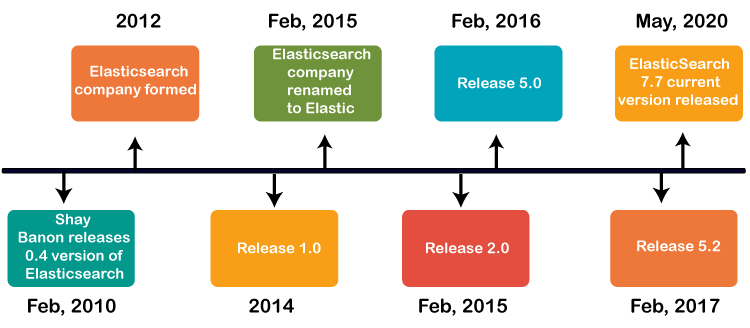
There are various changes has done in Elasticsearch, which are discussed below in detail-
| Year | Description |
|---|---|
| Feb 2010 | In February 2010, Shay Banon released the first version of Elasticsearch 0.4. |
| 2012 | In 2012, Elasticsearch company was formed. |
| Feb 2015 | In February 2014, Elasticsearch 1.0 was released. |
| Mar 2015 | Elasticsearch was renamed to Elastic on March 2015. |
| Oct 2015 | Another version of Elasticsearch 2.0 was released. |
| Oct 2016 | Elasticsearch 5.0 was released in October 2016. |
| Jan 2017 | Elasticsearch 5.2 was released in January 2017. |
| May 2020 | The current version of Elasticsearch 7.7 is released on May 13, 2020. |
Uses of Elasticsearch
After knowing that why Elasticsearch should be used? Let us now discuss the uses of Elasticsearch where it can be used -
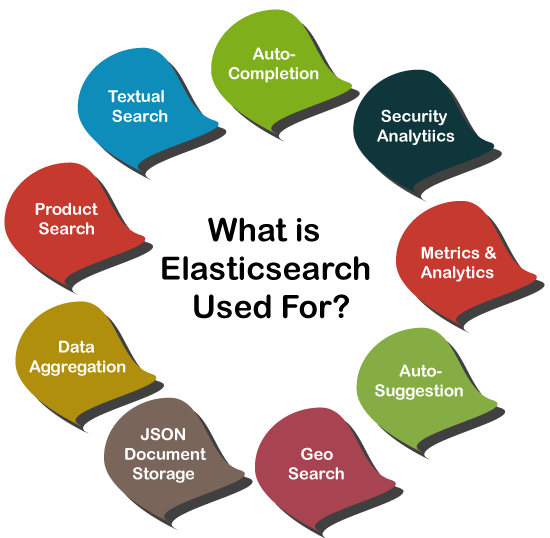
Elasticsearch is useful for searching of pure text. It is mainly used where there is a lot of text, but we want to search the data with a specific phrase for the best match. In other words, we search for pure text.
Product Search
Elasticsearch uses properties and name, which offers faster product searches.
Geo Search
Elasticsearch is also used for geo-localized any product. For example - A search query like "All institutes that offer PGDM courses in India" can be used to display relevant information of institute by Elasticsearch, which offers PGDM courses across India.
Where can Elasticsearch be used?
- Elasticsearch (ES) is used as a storage and analysis tool for logs that are generated by disparate systems.
- It has a schema-less nature. So, it does not require to add a new column for adding a new column to the table. Elasticsearch allows adding a new column to incoming data in an index. It accommodates the new columns and makes them available for further operations.
- Elasticsearch allows extracting the metrics from the incoming connection in real-time. Therefore, it works well with the time-series analysis of data.
Node
A node is a single server that is a part of a cluster. A node stores data and participates in the cluster’s indexing and search capabilities. An Elasticsearch node can be configured in different ways:
Master Node — Controls the Elasticsearch cluster and is responsible for all cluster-wide operations like creating/deleting an index and adding/removing nodes.
Data Node — Stores data and executes data-related operations such as search and aggregation.
Client Node — Forwards cluster requests to the master node and data-related requests to data nodes.
The Elastic Stack (ELK)

Elasticsearch is the central component of the Elastic Stack, a set of open-source tools for data ingestion, enrichment, storage, analysis, and visualization. It is commonly referred to as the “ELK” stack after its components Elasticsearch, Logstash, and Kibana and now also includes Beats. Although a search engine at its core, users started using Elasticsearch for log data and wanted a way to easily ingest and visualize that data.
Kibana
Kibana is a data visualization and management tool for Elasticsearch that provides real-time histograms, line graphs, pie charts, and maps. It lets you visualize your Elasticsearch data and navigate the Elastic Stack. You can select the way you give shape to your data by starting with one question to find out where the interactive visualization will lead you. For example, since Kibana is often used for log analysis, it allows you to answer questions about where your web hits are coming from, your distribution URLs, and so on. If you’re not building your own application on top of Elasticsearch, Kibana is a great way to search and visualize your index with a powerful and flexible UI. However, a major drawback is that every visualization can only work against a single index/index pattern. So if you have indices with strictly different data, you’ll have to create separate visualizations for each. For more advanced use cases, Knowi is a good option. It allows you to join your Elasticsearch data across multiple indexes and blend it with other SQL/NoSQL/REST-API data sources, then create visualizations from it in a business-user friendly UI.
Logstash
Logstash is used to aggregate and process data and send it to Elasticsearch. It is an open-source, server-side data processing pipeline that ingests data from a multitude of sources simultaneously, transforms it, and then sends it to collect. It also transforms and prepares data regardless of format by identifying named fields to build structure, and transform them to converge on a common format. For example, since data is often scattered across different systems in various formats, Logstash allows you to tie different systems together like web servers, databases, Amazon services, etc. and publish data to wherever it needs to go in a continuous streaming fashion.
Beats
Beats is a collection of lightweight, single-purpose data shipping agents used to send data from hundreds or thousands of machines and systems to Logstash or Elasticsearch. Beats are great for gathering data as they can sit on your servers, with your containers, or deploy as functions then centralize data in Elasticsearch. For example, Filebeat can sit on your server, monitor log files as they come in, parses them, and import into Elasticsearch in near-real-time.
What is Elasticsearch used for?
Now that we have a general understanding of what Elasticsearch is, the logical concepts behind it, and its architecture, we have a better sense of why and how it can be used for a variety of use cases. Below, we’ll examine some of Elasticsearch’s primary use cases and provide examples of how companies are using it today.
Primary Use Cases
Application search —- For applications that rely heavily on a search platform for the access, retrieval, and reporting of data.
Website search —- Websites which store a lot of content find Elasticsearch a very useful tool for effective and accurate searches. It’s no surprise that Elasticsearch is steadily gaining ground in the site search domain sphere.
Enterprise search —- Elasticsearch allows enterprise-wide search that includes document search, E-commerce product search, blog search, people search, and any form of search you can think of. In fact, it has steadily penetrated and replaced the search solutions of most of the popular websites we use on a daily basis. From a more enterprise-specific perspective, Elasticsearch is used to great success in company intranets.
Logging and log analytics —- As we’ve discussed, Elasticsearch is commonly used for ingesting and analyzing log data in near-real-time and in a scalable manner. It also provides important operational insights on log metrics to drive actions.
Infrastructure metrics and container monitoring —- Many companies use the ELK stack to analyze various metrics. This may involve gathering data across several performance parameters that vary by use case.
Security analytics —- Another major analytics application of Elasticsearch is security analysis. Access logs and similar logs concerning system security can be analyzed with the ELK stack, providing a more complete picture of what’s going on across your systems in real-time.
Business analytics —- Many of the built-in features available within the ELK Stack makes it a good option as a business analytics tool. However, there is a steep learning curve for implementing this product and in most organizations. This is especially true in cases where companies have multiple data sources besides Elasticsearch–since Kibana only works with Elasticsearch data. A good alternative is Knowi, an analytics platform that natively integrates with Elasticsearch and allows even non-technical business users to create visualizations and perform analytics on Elasticsearch data without prior knowledge or expertise of the ELK Stack.


Comments
Post a Comment